Configure SFTP credentials
SFTP credentials enable the Payflow service to sign in to the file transfer platform. Adding a credential automatically creates a web user on the file transfer platform that this Payflow service will use to deposit or retrieve files. To add an SFTP credential for your service:
- Go to the Payflow Services tab.
-
On the Payflow Services tab, select the Payflow service that you want to migrate.
-
Select Configure.
-
The SFTP Credentials section is at the bottom of the page:
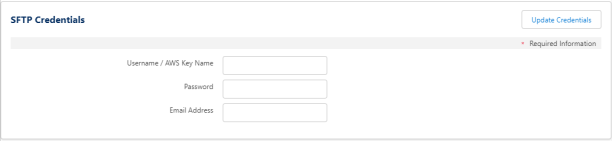
Enter a username, password, and email address to create a user account on the SFTP service for the Payflow service. The service uses this user account to deposit or retrieve files from the file transfer platform.
Note If you're migrating from the legacy SFTP platform, your Payflow service will already have a username, which you can't change. As long as you've performed the previous setup step (Set the SFTP service), you can update the password and email address. This is on the Payflow service to create the user on the file transfer platform.
If you find you have a duplicate username on your Payflow service, change the name of one of them. Do this by reverting the SFTP service to CompleteFTP. Change the username to something unique, then change SFTP back as per the initial instructions.Note:
-
The username must be unique to each Payflow service
-
A different file transfer platform user account can't already exist for the Payflow service. If you need to use a different user account, create a new Payflow service
-
For ease, we recommend you enter the username as a combination of your company ID and the folder name you use for the service. For example,
ACMECorp_payslips -
The system requires the address you enter in the Email Address field. Tt has to be unique to create the user account on the platform. But it doesn't use it currently. You can't reuseeEmail addresses for the administrator account you created earlier. This is due to uniqueness requirements. We suggest using the following format:
<customer+payflow>@support.fairsail.com
Note This needs to be unique for the whole platform. So it's possible if you don't have a short identifier for yourself as a customer, you can duplicate names used by other customers. if you receive a message indicating it's not unique, adjust it until you find a unique combination.Current policy states passwords must:
-
Be at least 8 character(s) long
-
Contain at least 1 uppercase letter
-
Contain at least 1 digit
-
Only special characters permitted for Payflow Service SFTP credentials are ~ @ $ * ( ) - _ ? / ; : , .
Note You can later change the password for the user account directly in the file transfer platform. Be sure to update the details for the Payflow service using these fields as well. The select Update Credentials. -
- Select Update Credentials. A confirmation message is displayed.
Next, Configure outbound settings.