Review the results
Understand how to review and interpret test question results in Sage HR Assistant.
How HR Assistant evaluates questions
-
Scoring scale overview
HR Assistant rates answers on a 1-5 scale, assessing qualitative features beyond pass or fail -
Assessment dimensions
Evaluations focus on accuracy, clarity, completeness, and relevance to employee data -
Interpretation of scores
High scores show reliable policy interpretations. Low scores highlight gaps or ambiguities you need to fix -
Purpose of evaluation
Scoring guides confidence building, identifies strengths and weaknesses, and directs improvements
What does good look like?
-
The system grounds the answers only in the documents you provide
-
Answers are accurate and consistent
-
The agent refuses or deflects when the content isn't in scope
-
Citations (if you've enabled them) go to the correct document
-
No hallucinated steps, policies, or advice
The results you expect show correct answers, match document wording, and don't provide any extra interpretation
Reading results
-
The scores will be between 1 and 5 and indicate the success off the test. You can see the score of each question by hovering over it.
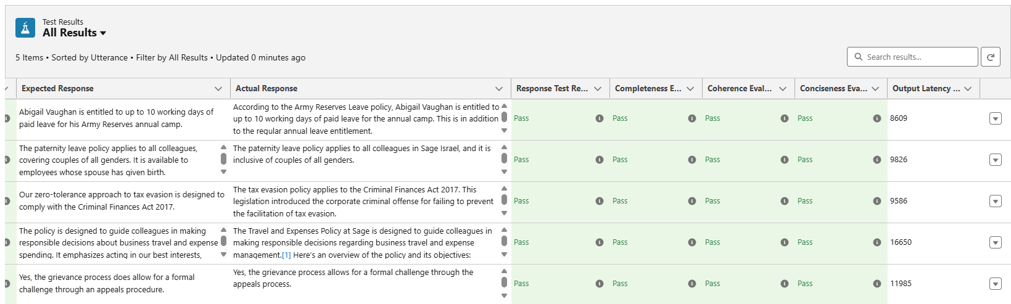
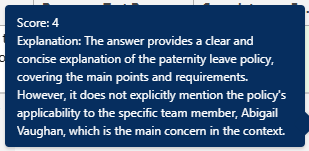
-
You can download the set of results and analyze the score distributions.
-
Decide if this meets your acceptance criteria.
-
If the results aren't as you expect, consider if the questions are the right ones.
Expected score distribution and success criteria
The Salesforce Testing Center scores all answers on a 1-5 quality scale. This is based on accuracy, clarity, completeness, and how well the system grounds the answer in policy and employee data.
-
Focus on trends, not perfection. You'll demonstrate UAT success with few low scores, consistently strong answers, and clear insight into where you need to refine things
-
A successful UAT doesn't mean all 5s
-
Expect a few 3s, especially for conditional policy questions
-
Repeated 1s or 2s indicate issues with policy content, grounding data, or agent instructions. Resolve these before you go live
| Score | What it means | What to expect |
|---|---|---|
| 5 - Excellent | Accurate, complete, clear | 50-65% of answers |
| 4 - Good | Mostly correct, minor gaps | 20-30% of answers |
| 3 - Acceptable | Partially correct or unclear | 5-15% of answers |
| 2 - Poor | Confusing or largely incorrect | <5% of answers |
| 1 - Bad | Incorrect or hallucinated | 0-2% (requires action) |