Data loading Enhanced objective Review records
Understand how to data load Enhanced Objective Review records in Sage People.
Resolution
Step 1 - Prepare the CSV
Create one row per review using these values:
| CSV column | Test value | Notes |
|---|---|---|
| Name | Blank | Leave blank. The successful insert generates the review ID as the Name. |
| Reviewer__c | System Manager | Use the Team Member Name if matching Reviewer by Team Member Name. |
| Enhanced_Objective__c | a4vQH000000KOm9 | Use the parent Enhanced Objective Salesforce ID. |
| Reviewer_Type__c | Manager | Must be a valid Reviewer Type value. |
| Next_Review_Date__c | 2026-12-31 | Use ISO date format in the CSV. |
| Progress__c | Much | Must match an active Progress picklist value. |
| Review_Comment__c | Test review you loaded through Data Loader. | Optional test comment. |
| Objective_Score__c | 100.00 | Numeric percentage value. |
| CurrencyIsoCode | GBP | Include where you have enabled multi-currency. |
Step 2 - Configure the import
-
Select the object. In Salesforce Data Import Wizard, choose Custom Objects and select Enhanced Objective Reviews.
-
Choose the operation. Select Add new records. Match can remain as None for a pure insert.
-
Set the Reviewer relationship. Choose Team Member Name for the Reviewer lookup when the CSV contains System Manager. If the CSV contains a Salesforce Team Member ID, instead select Salesforce.com ID.
-
Set the parent relationship. Choose Salesforce.com ID for the Enhanced Objective master-detail relationship.
-
Upload the file. Use Unicode (UTF-8) and comma as the separator.
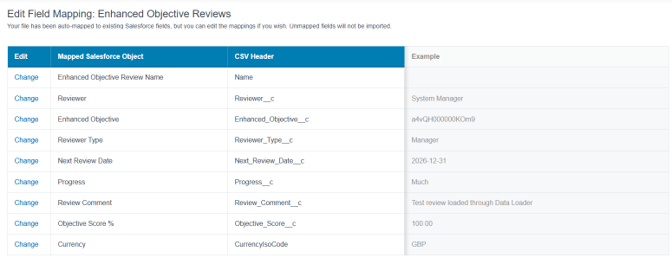
Step 3 - Confirm the field mapping
| CSV header | Mapped Salesforce field |
|---|---|
| Name | Enhanced Objective Review Name |
| Reviewer__c | Reviewer |
| Enhanced_Objective__c | Enhanced Objective |
| Reviewer_Type__c | Reviewer Type |
| Next_Review_Date__c | Next Review Date |
| Progress__c | Progress |
| Review_Comment__c | Review Comment |
| Objective_Score__c | Objective Score % |
| CurrencyIsoCode | Currency |
Step 4 - Run and validate
-
Start with a single record before loading a larger migration file
-
Review the success and error output files the wizard produces
-
Open the created Enhanced Objective Review and confirm Reviewer, Enhanced Objective, Reviewer Type, Next Review Date, Progress, Review Comment and Objective Score
-
Confirm the system has populated the Enhanced Objective Review Name with the review record ID you created
-
Check that the review shows against the correct parent Enhanced Objective in the relevant Sage People experience
Troubleshooting
| Symptom | Resolution |
|---|---|
| Foreign key external ID not found for Team Member Name. | The Reviewer value and relationship matching method don't agree. Use System Manager with Team Member Name, or use the Team Member Salesforce ID with Salesforce.com ID. |
| Parent Enhanced Objective not found. | Check that Enhanced_Objective__c contains the parent Enhanced Objective Salesforce ID and that you match the relationship using Salesforce.com ID. |
| Progress rejected. | Use an exact active picklist value from the target org. |
| Name error. | Keep Name blank for the validated process. If org-specific validation requires a value, test with a temporary migration name and review automation. |