Forms | Configuration options
Understand your Forms configuration options in Sage.
Go to Setup. In Quick Find, enter Installed and select Installed Packages from the search results. On the list of packages, select Configure next to the HCM package.
| Option | Description |
|---|---|
| Form Reminder Email Batch |
Run Now Button. Select to run the Form Reminders Batch. The batch sends email reminders to Form responders if:
See Email notifications. |
Policy options
| Option | Description |
|---|---|
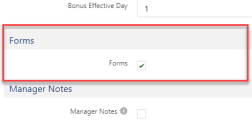
| Forms |
Select to enable forms for the policy. |
Field sets
| HCM Form object | |
|---|---|
| Field set | Description |
| HCM Form Details |
Field displays in the HCM Form detail view. |
Picklists
None.
Object fields
To rename these custom fields:
-
Go to Setup and in Quick Find enter Override.
-
On the Override page select the:
-
Package hosting the object
-
Language
-
Setup Component = Custom Field
-
Object
-
Aspect = Field Label
-
-
Enter new values in the Field Label Override column
| HCM Form object | |
|---|---|
| Field | Data type |
| Active | Checkbox |
| Actor | Text(255) |
| Actor Salutation | Text(255) |
| Approval Date | Date |
| Assessment | Lookup(Assessment) |
| Close Date | Date |
| Competency Assessment | Lookup(Competency Assessment) |
| Completed Date | Date |
| Concerning | Text(255) |
| Contact | Lookup(Contact) |
| Created By | Lookup(User) |
| Current Page | Text(255) |
| Data | Long Text Area(32000) |
| Employment | Lookup(Employment Record) |
| EncodeId | Text(255) |
| Form Definition | Lookup(HCM Form Definition) |
| Form Definition Name | Text(80) |
| Form Reference | Auto Number |
| Incident Report | Lookup(Incident Report) |
| Last Modified By | Lookup(User) |
| Last View Date | Date |
| Last View IP | Text(15) |
| Manager Action | Formula (Text) |
| Manager Action Date | Formula (Date) |
| Manager Approves | Checkbox |
| Object ID | Text(20) |
| Owner | Lookup(User,Group) |
| Rejected Date | Date |
| Relates To | Lookup(HCM Form) |
| Reminder Date | Date |
| Request By Date | Date |
| Request Prefix | Text(128) |
| Request URL | Formula (Text) |
| Salutation | Formula (Text) |
| Start Date | Date |
| Subject | Text(255) |
| Team Member | Lookup(Team Member) |
| Trigger Send Email | Checkbox |
| VisualForce Page | Text(128) |
| VisualForce Submit | Text(128) |
| HCM Form Datum object | |
|---|---|
| Field | Data type |
| Category | Formula (Text) |
| Created By | Lookup(User) |
| Data Name | Text(80) |
| Form | Master-Detail(HCM Form) |
| Last Modified By | Lookup(User) |
| Long Value | Long Text Area(32000) |
| Score | Number(4, 1) |
| Value | Text(255) |
| HCM Form Definition object | |
|---|---|
| Field | Data type |
| Created By |
Lookup(User) |
| Definition | Long Text Area(32000) |
| Definition Name | Text(80) |
| EncodeId | Text(80) |
| Last Modified By | Lookup(User) |
| Link Relationship | Text(128) |
| Object Name | Text(80) |
| Owner | Lookup(User,Group) |
| Permit New Forms | Checkbox |
| Permit New Object | Checkbox |
| Request Prefix | Text(128) |
| VisualForce Page | Text(128) |
| VisualForce Submit | Text(128) |
| HCM Form Rule object | |
|---|---|
| Field | Data type |
| Condition | Long Text Area(32000) |
| Created By | Lookup(User) |
| Direction | Picklist |
| Form Data Name | Text(80) |
| Form Definition | Master-Detail(HCM Form Definition) |
| Last Modified By | Lookup(User) |
| Object Field Name | Text(128) |
Record types
None.
Actions
-
Manager: Approve Form. Appears when:
-
The Forms process is set up to require manager approval for team member forms. The manager receives an action to approve each form a team member submits
-
-
Team member: Edit. Appears when:
-
The team member has a form assigned that they haven't submitted
-
-
Team member: Delete. Appears when:
-
The team member has a form assigned that they haven't submitted
-
Action events
|
Event |
When sent |
|---|---|
| Approve | When a designated approver approves a submitted form . |
|
Reject |
When a designated approver rejects a submitted form. |
|
Start |
When a Team Member starts a Form. |
|
Submit |
When a Team Member submits a Form. |