A My Domain URL, or custom domain, is an organization-specific identifier. You'll use it as a subdomain for your organization's Sage People login page and as the subdomain for any Salesforce sites you configure.
With an org-specific URL, you can set up a custom-branded login page, set a custom login policy, and offer a single sign-on.
Use the My Domain page to manage your My Domain URL, configure custom branding for your organization's login page, and define authentication options.
My Domain URL
Update the My Domain for your organization
- Go to Setup. In Quick Find, enter My Domain.
- On the My Domain page, select Edit under My Domain Details.
- Enter your chosen subdomain, and select Check Availability. Find a unique subdomain that's not already in use.
- The system sets the Domain Suffix at the default value of Standard (*.my.salesforce.com).
- Select Save to register the new domain.
- Salesforce will provision the new domain. Salesforce will notify you by email when they provision the domain.
-
When Salesforce provisions the domain, return to the My Domain page to deploy the new domain. Or cancel your changes and keep the old domain.
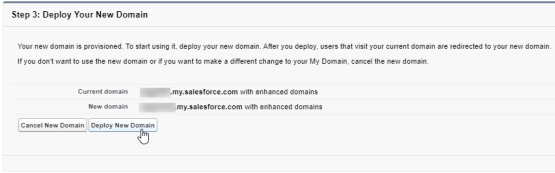
My Domain settings
For more information about the settings on the My Domain page, see the Salesforce help article: Configure My Domain Settings.
The additional settings on this page include:
| Setting | Salesforce help article |
|---|---|
|
Branding your organization's login page |
https://help.salesforce.com/s/articleView?id=sf.domain_name_login_branding.htm |
| Using discovery login | https://help.salesforce.com/s/articleView?id=sf.domain_name_login_discovery.htm |
|
Adding identity providers to your My Domain for single sign-on |
https://help.salesforce.com/s/articleView?id=sf.domain_name_login_id_prov.htm |
|
Customizing My Domain for mobile authentication |
https://help.salesforce.com/s/articleView?id=sf.domain_name_login_mobile_auth_methods.htm |