Setup Permissions
Sage People includes a permission set that you need for Docusign API access. You don't need to create this manually.
Pre-deployed permission set
You need to explicitly grant users permission to use an External Credential. This includes System Administrators. You need to assign the permission set to each user.
The two required permissions given by the permission set are:
-
Access to the External Credential
-
Read access to the User External Credential record that stores the user's connection
If either of these are missing, attempts to send Docusign envelopes from Sage People will fail.
Docusign server permission set
This enables the Server_to_Server integration method. Users you assign this permission set to send envelopes anonymously using the Integration/Service Account as the sender. This is essentially the User ID from earlier in the process.
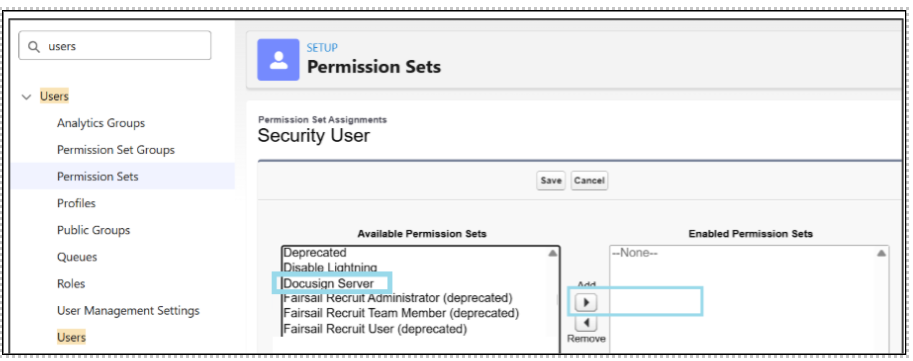
Assign the Docusign Server permission set to every Sage People user who needs to generate Docusign envelopes from Sage People, You can do this by:
-
Assigning the permission set to individual users
-
Assigning the permission set to a permission set group that multiple users use
Adding to users:
Adding to permission set groups:
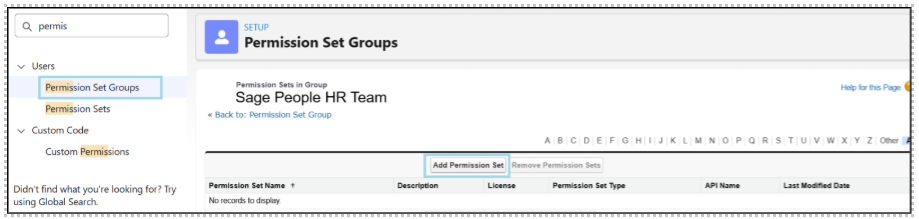
Just click Add Permission Set, select the Docusign Server permission set, add it, and Save.
Make sure all user who'll trigger Docusign envelopes have the Docusign Server permission set assigned.